Comprehensive Guide to Malware Analysis: Investigating Malicious RTF Files Using REMnux
A step-by-step analysis of a malicious RTF document on REMnux with rtfdump, rtfobj and scdbg, from embedded objects to the shellcode they carry.
Originally published on Medium.
On this page
Malware analysis is a critical skill in cybersecurity that enables analysts to dissect and understand potential threats, allowing them to mitigate risks effectively. In this comprehensive guide, we’ll explore a structured approach to analyzing a suspicious Rich Text Format (RTF) document using REMnux, a Linux distribution specifically designed for malware analysis.
We’ll cover everything from initial setup to deep analysis of embedded shellcode, providing a step-by-step breakdown of the techniques and tools used in modern malware analysis. This guide is ideal for cybersecurity enthusiasts, professionals in incident response, or anyone aiming to understand the fundamentals of malware analysis.
Steps of Performing Malware Analysis:
Link to section: Steps of Performing Malware Analysis:1. Setting Up the Analysis Environment
Link to section: 1. Setting Up the Analysis EnvironmentBefore diving into the malware, ensure you’re working in a secure, isolated environment, like REMnux, to prevent accidental infection of your primary system.
-
Create a Secure Workspace: Download and set up REMnux, and create a dedicated directory for your investigation files.
-
Acquire the Malicious File: Locate and download the document. Important: Only handle malicious files within a virtual machine or secure sandbox environment.
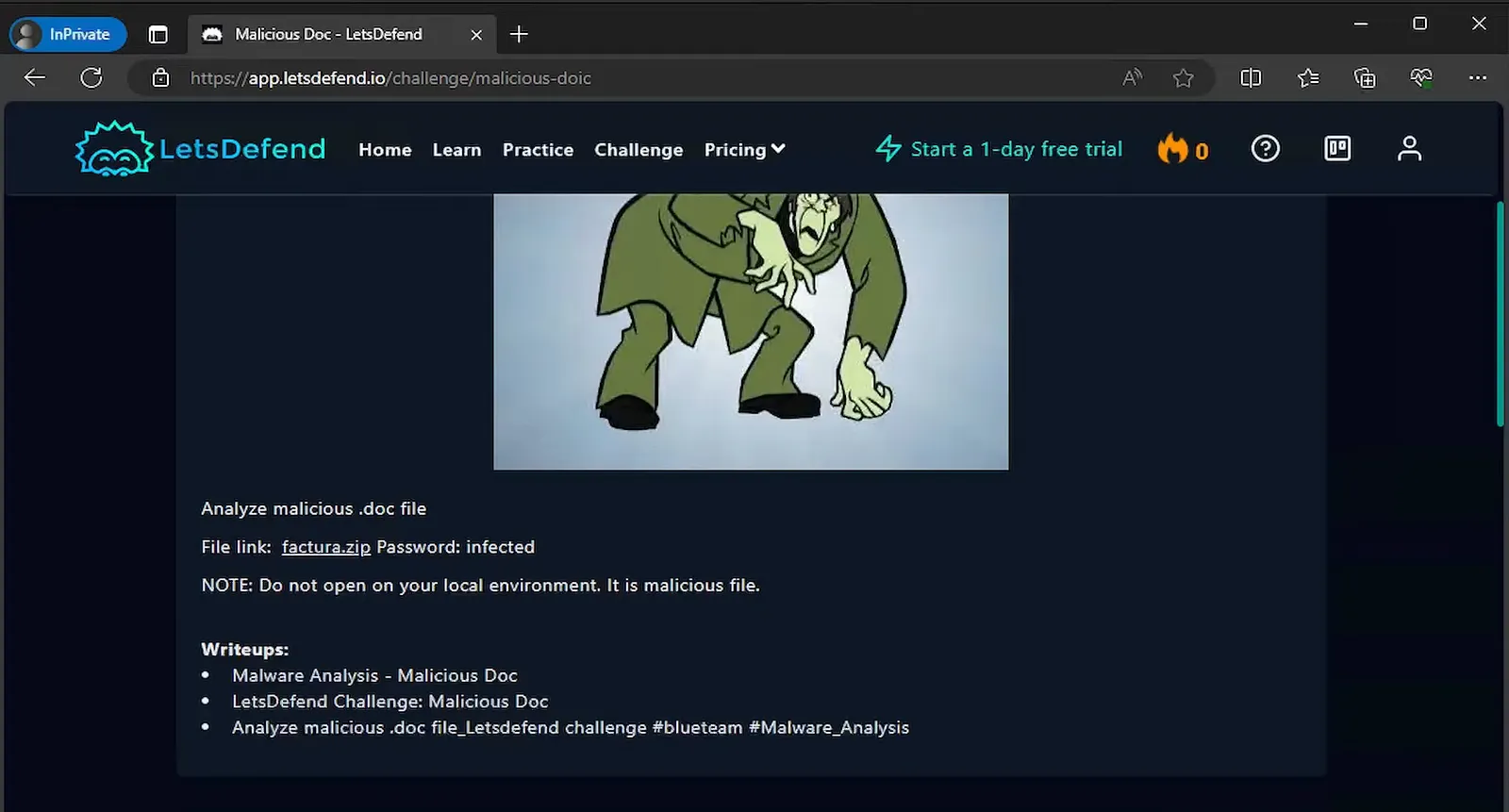
Screenshot: Acquiring the Malicious File
2. Conducting Preliminary Static Analysis
Link to section: 2. Conducting Preliminary Static AnalysisThe first step in malware analysis is to gather as much information as possible without actually executing the file. This approach is known as static analysis, where you inspect the file’s metadata, structure, and initial properties.
- Calculating the File Hash: Start by generating a SHA-256 hash of the file. This unique identifier allows you to check for matches against known malware in threat intelligence databases such as VirusTotal.
sha256sum factura.doc- Confirming the File Type: Use the
filecommand to verify the document’s type. Although you may know it’s an RTF, this command checks for any deceptive extensions, confirming the actual file format.
file factura.doc- Assessing File Size: Checking file size with
ls -lhcan reveal irregularities. For instance, very large RTF files may indicate hidden content or embedded objects that can contain payloads.
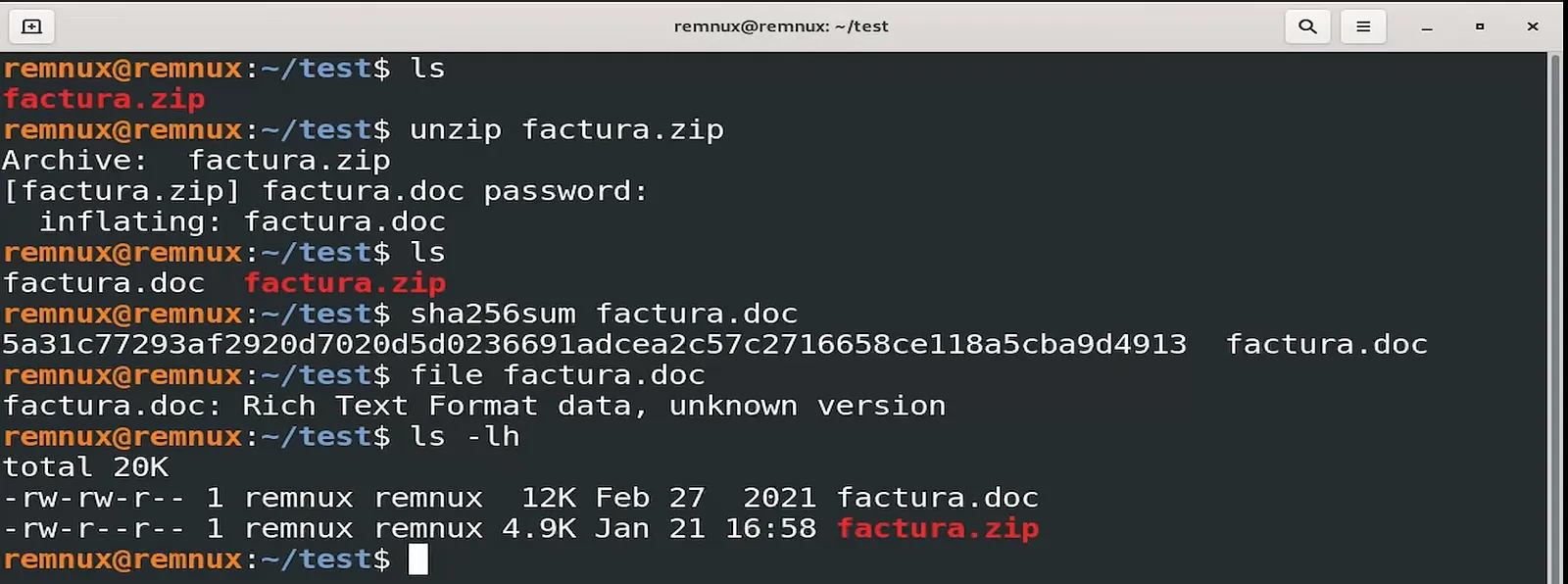
Screenshot: Preliminary file analysis using hash, type, and size commands
3. Using EXIF Tool for Metadata Extraction
Link to section: 3. Using EXIF Tool for Metadata ExtractionMetadata often includes timestamps, author information, and document history, providing valuable background for further analysis. Although metadata can be altered, it may still help build a timeline and identify the file’s potential origins.
- Extracting Metadata with EXIF Tool: Run
exiftoolto uncover timestamps, document creator details, and any recent modifications. Malware authors sometimes forget to remove metadata, which can inadvertently reveal clues.
exiftool factura.docWhile metadata isn’t foolproof — timestamps and other details are easily manipulated — it can sometimes provide helpful clues, such as pointing to specific regions or typical working hours based on time zones.
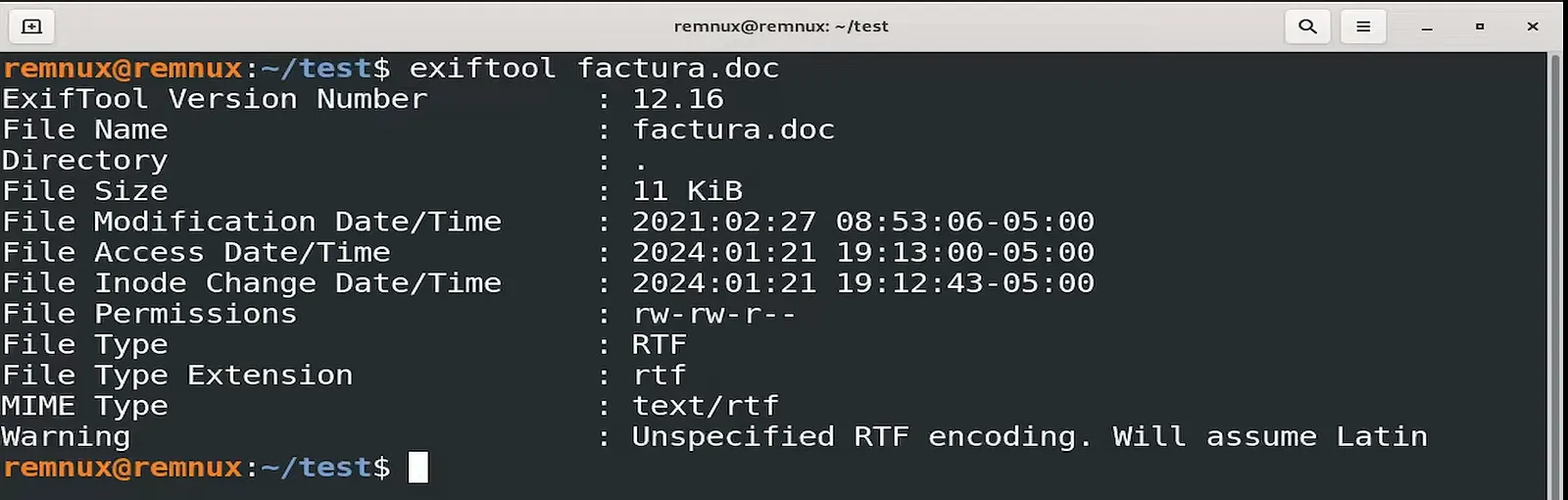
Screenshot: Metadata analysis results highlighting timestamps and potential user information
4. Exploring the Document’s Content Structure with RTF Dump
Link to section: 4. Exploring the Document’s Content Structure with RTF DumpRTF files frequently contain embedded objects, which are potential carriers of malicious code. Using rtfdump.py, you can parse the document and examine these embedded objects without triggering any of the document’s actions.
- Running RTF Dump for Object Detection: The command
rtfdump.py factura.doclists the objects and elements embedded within the RTF file. Focus on specific “streams” that may contain executable code or embedded data.
rtfdump.py factura.doc- Spotting Risky Keywords and Tags: As you inspect the document, look for terms like “object,” “data,” or “control.” These tags often indicate embedded content or executables that could activate on document load.
Embedded objects or streams containing executable instructions can indicate where the malware is hidden within the file.
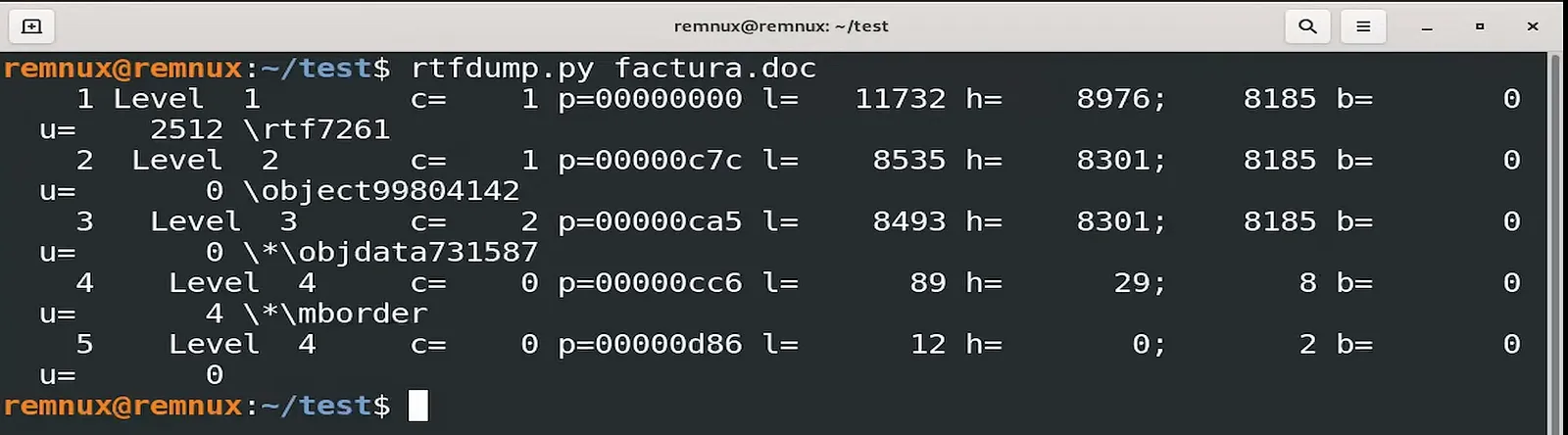
Screenshot: RTF Dump output showing embedded objects and keywords
5. Detailed Stream Analysis for Potential Malware Indicators
Link to section: 5. Detailed Stream Analysis for Potential Malware IndicatorsStreams are segments of data within an RTF file, often containing executable code or embedded objects. Investigating these streams can reveal additional information or allow you to locate suspicious content.
- Selecting Specific Streams: Each object or stream is assigned an ID. Use the
-soption withrtfdump.pyto isolate specific streams.
rtfdump.py -s 2 factura.doc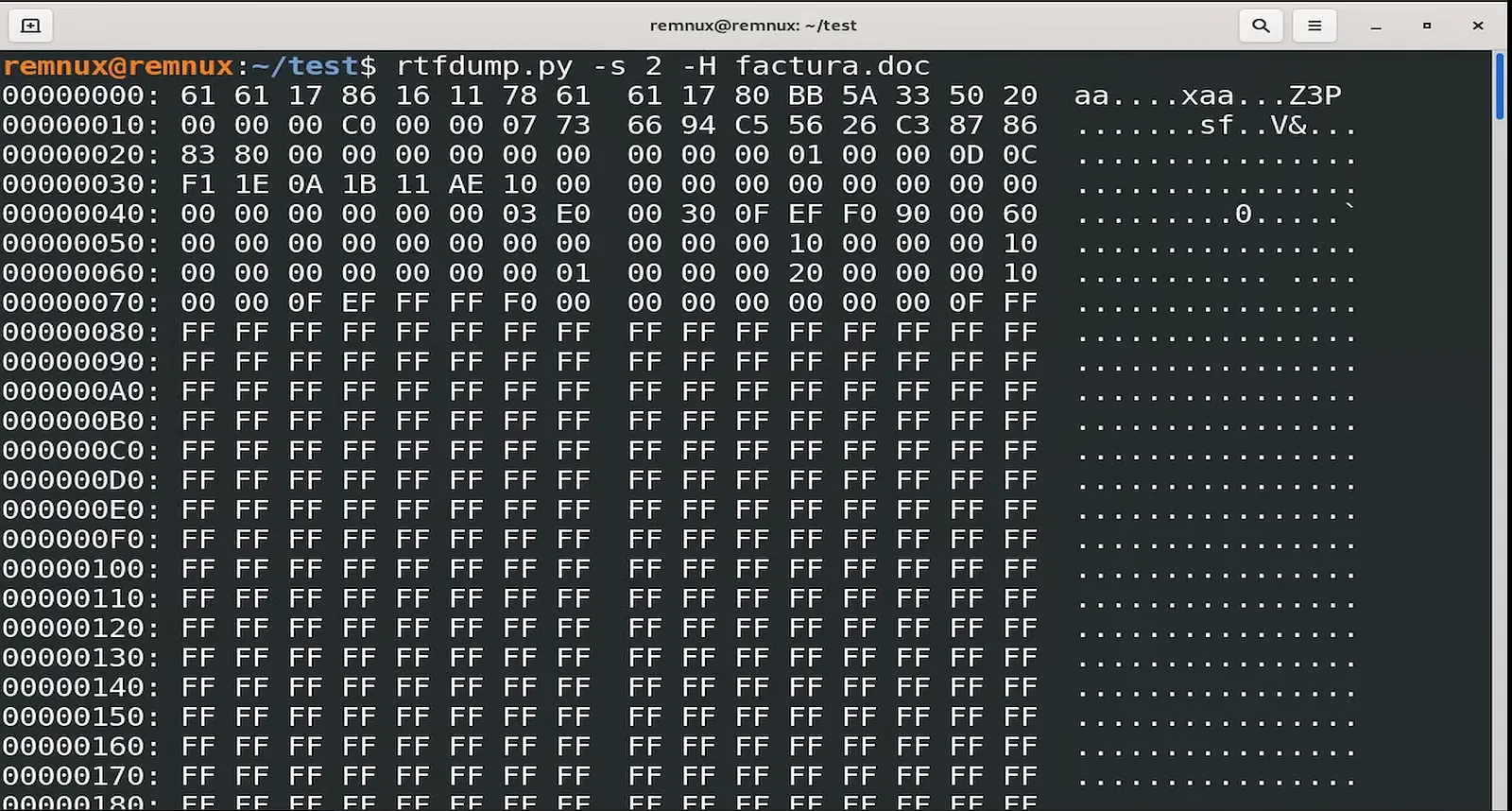
Screenshot: Stream decoding showing readable hex data and suspicious keywords
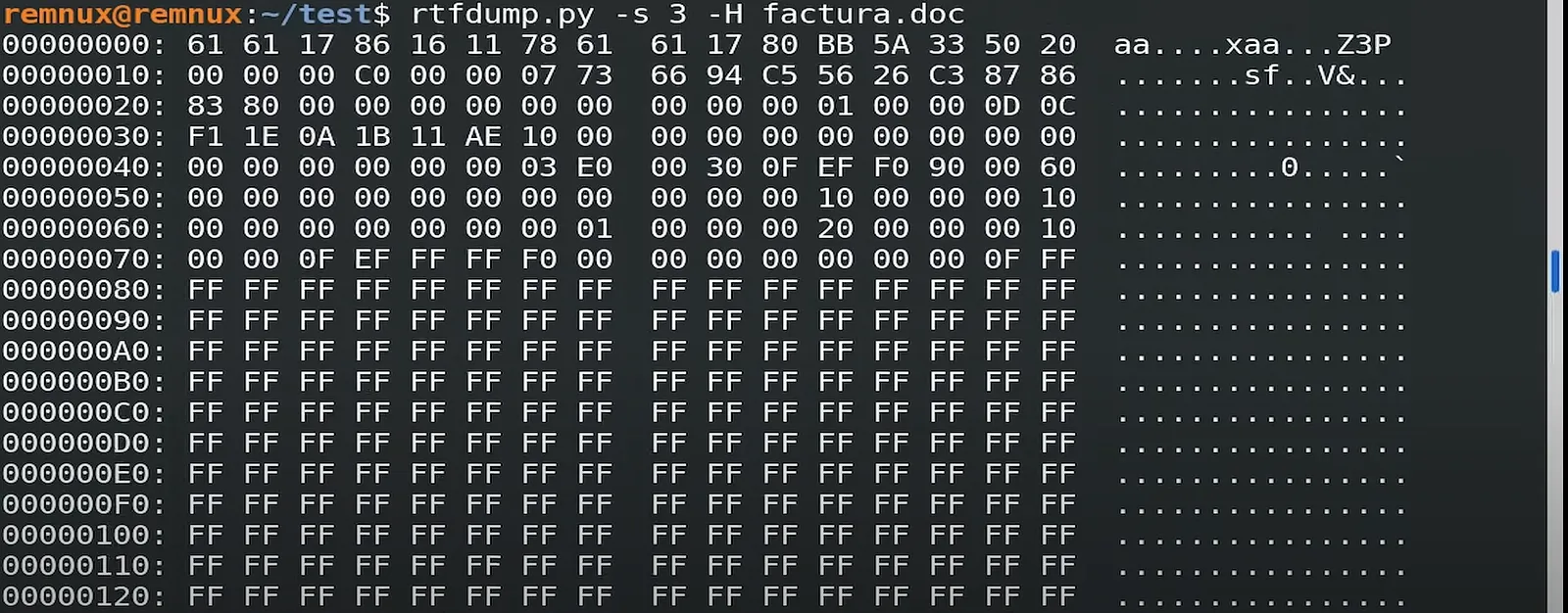
- Decoding Hexadecimal Data: Many RTF streams contain hexadecimal-encoded data. By using the
-Hoption, you can decode this into more readable text, potentially exposing malicious commands or encoded payloads.
rtfdump.py -s 3 -H factura.docInvestigate any readable keywords, commands, or URLs within these streams that could point to suspicious instructions or connections.
6. Identifying Vulnerabilities with RTF Object Analysis
Link to section: 6. Identifying Vulnerabilities with RTF Object AnalysisCertain vulnerabilities allow embedded RTF code to exploit software on a target system. Using rtfobj.py, you can detect known vulnerabilities and any corresponding Common Vulnerabilities and Exposures (CVEs) within the document.
- Detecting Vulnerabilities in RTF Content: Run
rtfobj.pyto identify embedded vulnerabilities. This command often highlights any known CVEs associated with the document’s objects, such asCVE-2017–11882, which exploits Microsoft Equation Editor.
rtfobj.py factura.doc- Researching CVEs: Document each CVE found and investigate the corresponding vulnerabilities. Reviewing CVE descriptions and associated software can provide insights into potential exploits or threat tactics used by attackers.
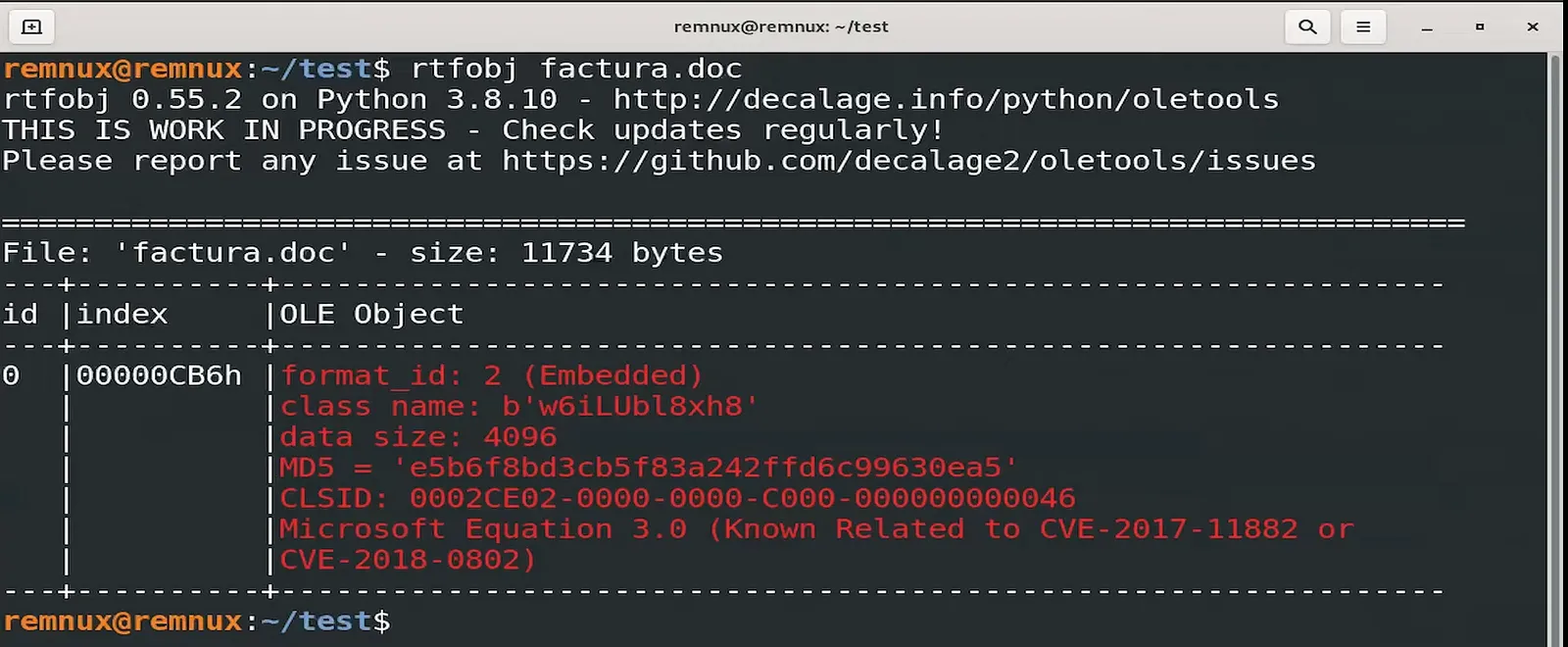
Screenshot: CVE identification output from RTF Object analysis
7. Inspecting OLE Objects for Embedded Executable Content
Link to section: 7. Inspecting OLE Objects for Embedded Executable ContentOLE (Object Linking and Embedding) objects are often used to hide executable content, such as scripts or payloads, in a seemingly innocuous document. With oledump.py, you can inspect and extract these OLE objects.
- Listing OLE Streams: The command
oledump.py factura.docshows the available streams. Streams labeled with terms like “objdata” or “equation” are commonly exploited.
oledump.py factura.doc- Drilling Down into OLE Content: Focus on specific OLE streams by using
-sfollowed by the stream ID. This will allow you to explore embedded code or binary data in detail.
oledump.py -s 1 factura.docOLE objects can contain anything from obfuscated commands to embedded executables, all of which can be harmful if opened in an unprotected environment.
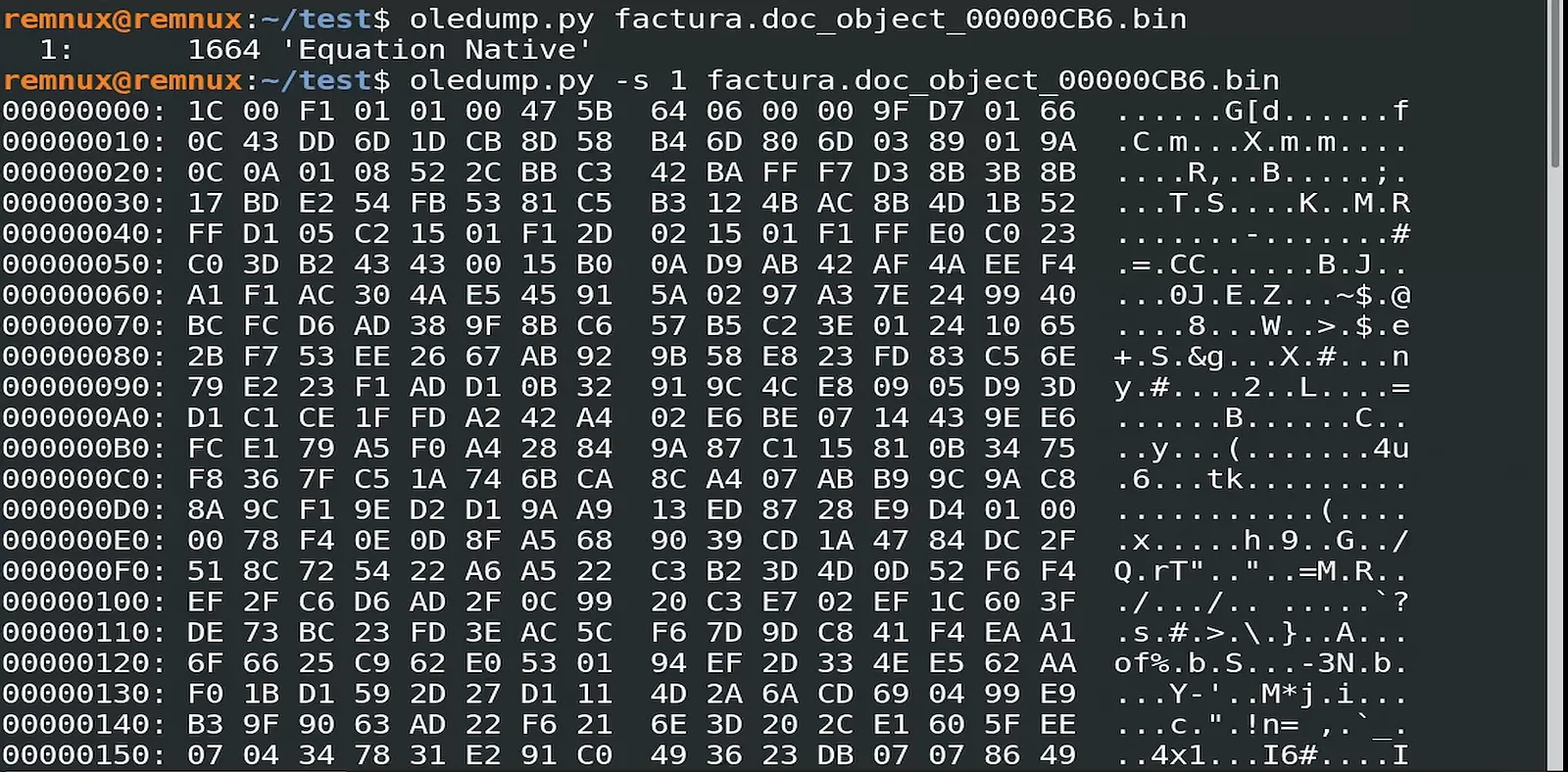
Screenshot: Detailed inspection of OLE objects with oledump output
8. Shellcode Detection and Analysis
Link to section: 8. Shellcode Detection and AnalysisIn malware analysis, shellcode refers to small pieces of machine code intended to exploit vulnerabilities and execute commands. REMnux provides tools to inspect and understand the functionality of shellcode hidden within documents.
- Analyzing Shellcode with scdbg: Use
scdbgto interpret and examine shellcode embedded in the RTF file. This tool helps you break down shellcode into readable components, revealing potentially harmful instructions.
scdbgThe scdbg output often reveals key functions like GetProcAddress, commonly used to locate functions within dynamic libraries (DLLs). Attackers use such functions to load malicious code on a victim’s system.
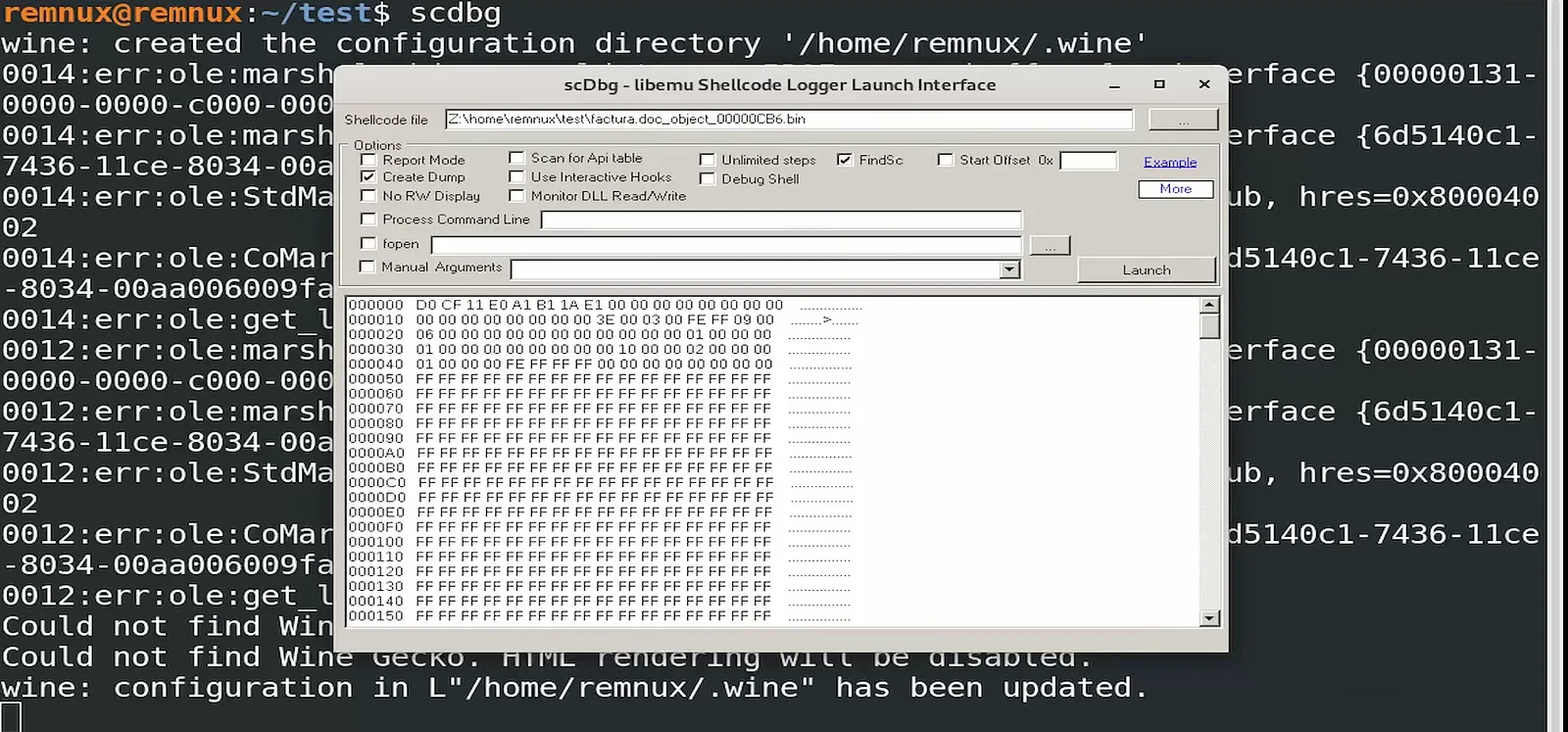
Screenshot: Shellcode analysis output with function details
9. Threat Intelligence for Network Indicators
Link to section: 9. Threat Intelligence for Network IndicatorsMalware often includes URLs, IP addresses, or domain names to connect with command-and-control (C2) servers or download additional payloads. Identifying these indicators enables you to cross-check with online threat intelligence sources like VirusTotal.
- Investigating Network Indicators: Enter any suspicious domain names, IP addresses, or URLs in VirusTotal to determine if they are associated with known malware campaigns. This step can validate your findings and provide additional context for the threat.
Document any connections flagged as malicious, noting any specific IP addresses or URLs found during analysis, as they may offer leads on the attacker’s infrastructure.
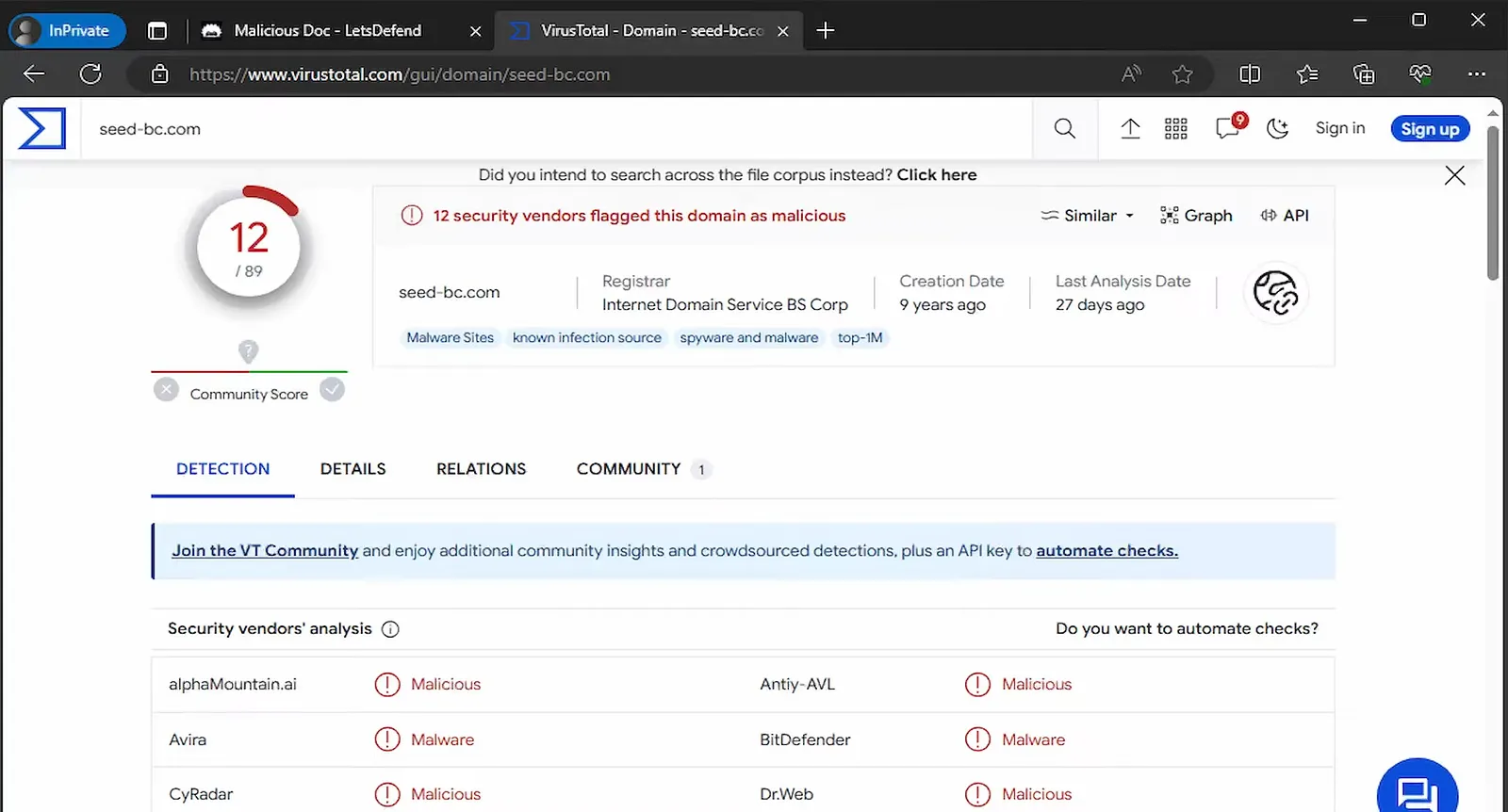
Screenshot: VirusTotal threat intelligence lookup with network indicators
10. Summarizing Findings and Reporting
Link to section: 10. Summarizing Findings and ReportingOnce your analysis is complete, organize your findings into a concise report. This final step ensures clear documentation of your process, insights, and conclusions for others in your team or organization.
Key Elements to Document:
-
File Details: Summarize the file’s metadata, hash, size, and type.
-
Embedded Vulnerabilities: List any CVEs and their potential impact.
-
Network Indicators: Document domains, IPs, or URLs associated with malicious activity.
-
Identified Payloads and Shellcode: Include any extracted objects, executables, or readable shellcode segments.
Conducting a detailed report not only reinforces your understanding of the document’s content but also provides valuable insights for future threat mitigation.
Conclusion
Link to section: ConclusionThis guide offers a structured approach to analyzing RTF files for malware threats. Practicing these techniques will enhance your skills in malware analysis, helping you to identify and understand threats with increasing confidence. As you gain experience with tools like REMnux, you’ll be better equipped to safeguard systems from evolving security threats and contribute effectively to your organization’s cybersecurity posture.